Cursor vs Claude Code is no longer a simple IDE-versus-terminal decision. In 2026, Cursor has a full CLI, headless automation, Cloud Agents and scheduled/event-driven Automations. Claude Code now runs in the terminal, VS Code, Cursor, JetBrains, a desktop app and the web, with background agents, recurring Routines and CI/CD integrations.
The practical question is no longer where does the tool run? It is which control model, model ecosystem, review loop, cloud execution model and billing structure fit the way you build software?
This comparison is based on current Cursor and Anthropic documentation. The core workflow comparison was reviewed on September 18, 2026; pricing and current model references were rechecked on September 25, 2026 after Cursor’s September updates and Claude Opus 5.5. It is a documentation-based product comparison, not a hands-on benchmark. We do not claim measured coding quality, token efficiency or task-success rates unless a first-party source explicitly reports them.
The short version
- Cursor is still the stronger fit when your center of gravity is an AI-native editor, fast interactive changes, native multi-model choice, Tab completion and a single environment that spans editor, CLI, Cloud Agents and team automation.
- Claude Code is the stronger fit when you want Claude as an agent layer that can move across terminal, IDE, desktop, browser, CI/CD and recurring routines while keeping one Claude account and shared instructions, skills, hooks and MCP configuration.
- The tools are not mutually exclusive. Anthropic officially supports installing the Claude Code VS Code extension in Cursor, so a real decision can be “Cursor as the editor plus Claude Code as an additional agent system” rather than choosing only one.
- Compare the plan and model costs, not just the entry price. New X Subscription plans start at US$8/month for Grok-only Plus; Premium at US$30/month adds Cloud Agents, Automations and third-party model access, with third-party usage billed separately. Existing Cursor Pro subscribers may retain their $20/month plan. Claude Pro remains a separate subscription.
Cursor vs Claude Code at a glance
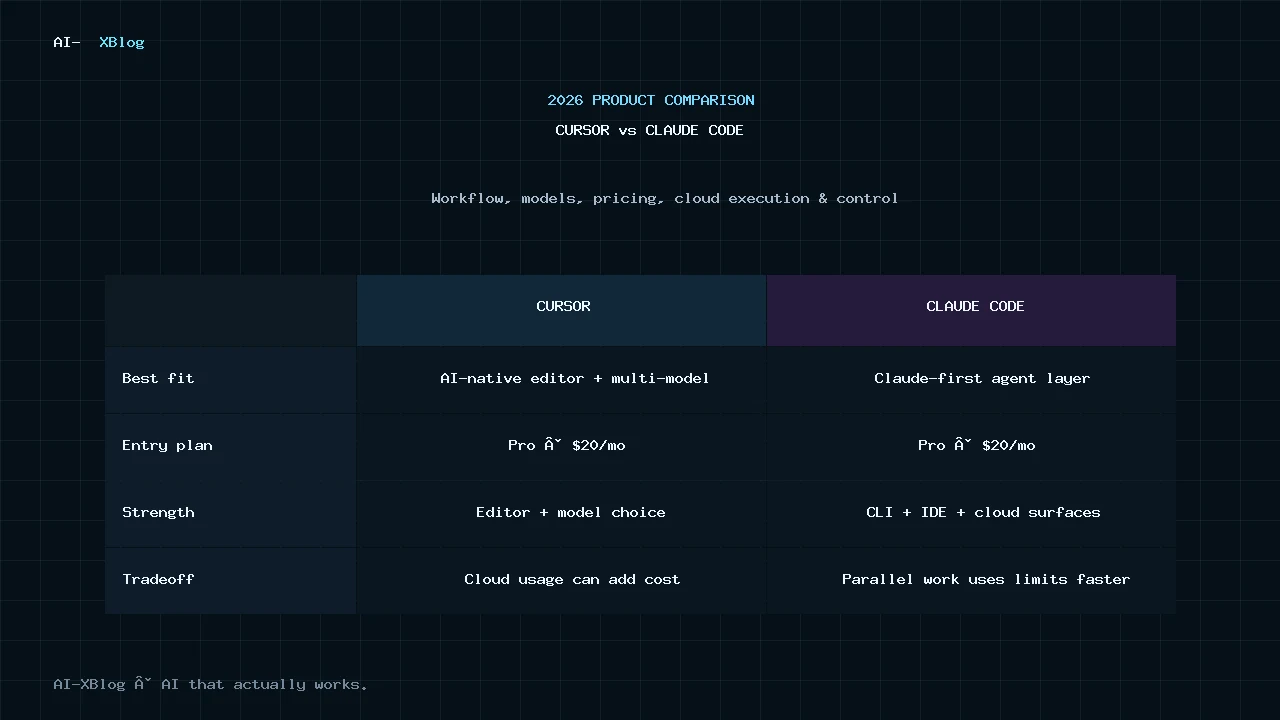
| Decision area | Cursor | Claude Code |
|---|---|---|
| Primary product shape | AI-native editor with Agent, CLI, Cloud Agents and Automations | Agentic coding system available across terminal, IDE, desktop and web |
| IDE experience | Native Cursor editor with Tab, inline editing, Agent and visual review | Native extensions for VS Code and JetBrains, including inline diffs and plan review |
| Terminal / CLI | Cursor CLI with Agent, Plan and Ask modes plus non-interactive output | Full Claude Code CLI designed for interactive and scripted use |
| Cloud execution | Cloud Agents run in isolated VMs and can work in parallel; new plans require Premium or above, while retained plans keep their existing eligibility | Web/background sessions and cloud Routines can continue without the local machine |
| Recurring automation | Automations can trigger on schedules or events such as GitHub, GitLab, Slack, webhooks and Linear; new plans require Premium or above | Routines can run on schedules and respond to API calls or GitHub events; desktop scheduled tasks can run locally |
| Model choice | New plans: Grok-only Plus; Premium and above add separately billed third-party models. Retained Cursor plans keep their existing model benefits. | Claude-first product; terminal and VS Code also support third-party infrastructure providers |
| MCP / extensibility | MCP, skills, hooks, rules, plugins and subagents | MCP, skills, hooks, CLAUDE.md, plugins, memory and Agent SDK |
| CI/CD | Headless CLI plus cloud/event automation | CLI scripting plus GitHub Actions and GitLab CI/CD integrations |
| Individual paid entry | New X Subscription: Plus $8/month (Grok only); Premium $30/month adds third-party model access billed separately. Existing Cursor Pro subscribers may retain their $20/month plan. | $20/month Pro, which includes Claude Code |
| Team self-serve entry | New X Subscription Teams starts at $30/user/month. Existing Cursor team plans can be retained; do not apply their old annual discounts to the new plans. | $25/user/month monthly or $20/user/month annually for Team Standard |
The table shows why the old framing has broken down. Both products now cover local editing, terminal workflows, cloud execution and automation. The differences are increasingly about how those capabilities are organized, not whether they exist at all.
What changed: Cursor is not just an IDE anymore
Cursor still begins with the editor experience, but its current product surface extends well beyond a VS Code-style desktop application.
The Cursor CLI provides Agent, Plan and Ask modes in the terminal. It also supports non-interactive use for scripts and CI pipelines. A local CLI conversation can be handed off to a Cloud Agent, then resumed through Cursor’s web or mobile agent interface.
Cloud Agents are included from Premium upward on the new plans; existing subscribers keep their retained-plan eligibility. They run in isolated virtual machines with cloned repositories, dependencies, secrets, startup commands and network access. They can build and test code, use MCP servers, work across multiple repositories and open pull requests. Cursor also supports starting these agents from its desktop app, web interface, Slack, source-control discussions, Linear and API calls.
Automations take that further. Cursor documents scheduled and event-driven Cloud Agent runs for tasks such as PR review, feature-flag cleanup, bug triage and security scans. Cursor Projects adds another orchestration layer above individual agents: a Project can preserve shared context over months of work, let a coordinator delegate tasks across many subagents, run recurring work without a fresh prompt, and combine cloud agents with local agents when testing needs access to your machine.
That means describing Cursor as only an interactive coding editor misses a substantial part of the 2026 product.
What changed: Claude Code is not terminal-only anymore
Claude Code began with a strong terminal identity, but Anthropic’s current documentation describes the same underlying Claude Code engine across multiple surfaces.
- Terminal: the full CLI for reading a codebase, editing files, running commands and scripting workflows.
- VS Code: a graphical extension with inline diffs, file and line references, editable plans, permission modes and multiple conversations.
- Cursor: Anthropic explicitly provides an install path for the Claude Code extension inside Cursor.
- JetBrains: a native plugin for IntelliJ IDEA, PyCharm, WebStorm and related IDEs.
- Desktop: visual diff review, parallel sessions and scheduled tasks.
- Web and mobile: cloud sessions can run long tasks and be resumed across devices.
Claude Code also supports GitHub Actions, GitLab CI/CD, MCP, skills, hooks, project instructions through CLAUDE.md, auto memory, multiple agents and the Agent SDK.
Claude Code Projects now adds a coordinator layer above individual cloud sessions. In the redesigned Projects beta announced September 17, 2026, you give a Project a goal and context, then a coordinator can scope the work, delegate tasks to parallel Claude Code threads, review outputs and assemble the result. Threads share project memory and a library of files and artifacts, while each thread remains a full Claude Code cloud session. The beta is initially rolling out to select Pro and Max subscribers using Claude Code cloud sessions; broader Claude Code access is expanding first, with Team, Enterprise and the rest of Claude planned later. Anthropic also warns that several parallel threads can consume usage limits faster.
For a production-oriented implementation, our Claude Code GitHub Actions security-first setup guide covers least-privilege permissions, safe triggers, secrets, branch protection, cost limits and staged rollout.
The result is that “Claude Code equals terminal” is now as incomplete as “Cursor equals editor.”
The real difference #1: Cursor is an environment; Claude Code is an agent layer
The most useful distinction is architectural.
Cursor is designed as the development environment itself. The editor, Tab completion, Agent, model picker, rules, Cloud Agents, automations, review tools and team administration are meant to live inside one Cursor product system.
Claude Code behaves more like an agent layer that can travel across environments. The same Claude Code engine can be used through a terminal, VS Code, Cursor, JetBrains, desktop or web surface. Your project instructions, settings and MCP configuration can move with that system rather than requiring Claude Code to become your editor.
This distinction matters more than whether a feature has a checkmark in a comparison table. It changes which tool becomes the center of your development workflow.
The real difference #2: model choice
Cursor remains a multi-model product, but access and billing depend on the subscription. On new X Subscription plans, Plus supports Grok models only; Premium and above add third-party models at API list prices with no included third-party allowance. Retained Cursor plans keep their earlier included usage rules until the subscriber switches. The older monthly model-pool documentation therefore does not describe the new weekly Grok pool.
Claude Code is built around Claude models. Anthropic’s current lineup includes Claude Opus 5.5 alongside Claude Sonnet 5.5, which launched on September 28, 2026. Sonnet 5.5 is a newer option for everyday coding; earlier Sonnet 5 references should not be read as the latest model recommendation. Claude Code requires v2.1.284 or later for Sonnet 5.5, and the model selected by an alias depends on the provider. Anthropic does support third-party infrastructure providers for the terminal CLI and VS Code, but that is different from Cursor’s native “choose among several model families inside one coding product” approach.
If switching model families task by task is central to your workflow, Cursor’s product architecture makes that a first-class decision. If you specifically want the Claude ecosystem, Claude Code keeps the product, subscription and agent system more vertically integrated.
The real difference #3: interactive editing versus delegated execution
Both products can now work interactively or autonomously, but their default ergonomics still differ.
Cursor’s strongest native experience remains the tight editor loop: navigate code, accept Tab suggestions, ask Agent for a change, inspect a diff, refine the result, and continue coding without leaving the main editor.
Claude Code’s strongest identity is delegation across surfaces: describe a task, let the agent inspect and modify the repository, run commands and tests, then review the result in whatever surface makes sense. Its desktop, web, background-agent and routine features reinforce that model.
Neither distinction is absolute anymore. Cursor can delegate work to Cloud Agents; Claude Code can work directly inside an editor with inline diffs. Treat this as a question of default workflow gravity, not a hard capability boundary.
Pricing: new X Subscription plans versus retained Cursor plans
Pricing update, checked October 13, 2026: the October 12 X Subscription announcement introduces a new subscription across Cursor, Grok and X, with global availability rolling out over the following days. Cursor’s current pricing page lists Free $0, Plus US$8/month, Premium $30/month, Super $100/month and Ultra $200/month, before applicable taxes or fees. Plus supports Grok models only; Premium and above allow third-party models billed separately. Existing Cursor subscribers may keep their current plan, price and benefits; account switching is rolling out, and there is no announced mandatory migration date. For new-versus-retained plan context, see our Cursor Pricing in 2026 guide. Check the official pricing and your account for the plan available to you. For the Claude side—including Pro, Max, Team, usage credits and API billing—see Claude Code Pricing in 2026.
| Plan level | Cursor | Claude / Claude Code |
|---|---|---|
| Free / usage-based entry | Free: limited Agent requests; existing Hobby references describe the earlier plan lineup | No directly comparable free Claude Code subscription bundle; Terminal/VS Code can also authenticate through Anthropic Console or supported third-party providers |
| Entry individual | New Plus: $8/month, Grok models only; Premium: $30/month, with third-party models charged separately. Retained Cursor Pro: $20/month. | Pro: $20/month or $200/year; Claude Code included |
| Higher individual usage | New Super: $100/month; Ultra: $200/month. Existing Cursor Pro+ and Ultra plans can be retained with their original benefits. | Max 5x: $100/month; Max 20x: $200/month |
| Team Standard | New X Subscription Teams: Premium $30/user/month; retained Cursor Teams Standard keeps its existing terms | $25/user/month monthly or $20/user/month annually |
| Team high-usage seat | New X Subscription Teams: Super $100 or Ultra $200/user/month; retained Cursor Teams Premium keeps its existing terms | Premium: $125/user/month monthly or $100/user/month annually |
| Beyond included usage | New plans share a weekly Grok usage pool across Cursor and Grok; third-party models on Premium and above are separate top-ups at API list prices. Retained Cursor plans keep their earlier included usage and billing rules. | Usage credits / prepaid usage packages can extend work across Claude, Claude Code and Cowork |
For current Claude plan details, see our Claude Pricing in 2026 guide. The subscriptions are not directly equivalent: new X Subscription plans bundle Cursor, Grok and X, while Claude subscriptions cover the Claude product family. Existing Cursor subscribers retain the earlier development-focused plan unless they choose to switch.
Usage economics matter more than sticker price
For retained Cursor subscriptions, the older documentation still describes separate monthly usage pools and on-demand billing. The new X Subscription instead has a shared weekly Grok allowance across Cursor and Grok; third-party model usage is not included in the subscription price and is purchased separately on Premium and above. The old and new allowances should not be combined or treated as interchangeable. Check the plan shown in the account before estimating costs.
Claude’s consumer and team subscriptions use session and weekly limits, with optional extra usage through credits or usage packages. Anthropic also increased Claude Code’s five-hour limits in May 2026.
For a serious team evaluation, model one month of expected work instead of multiplying the advertised seat price. Track how many developers use agents daily, how many cloud/background jobs run, which models are selected, and how much work spills beyond included usage.
Team governance: both are now serious organizational products
Cursor Teams includes centralized billing and administration, team usage analytics, a team marketplace, privacy-mode enforcement, SAML/OIDC SSO, Cloud Agents with shared team context and Bugbot code review. Cursor Enterprise adds pooled usage, SCIM, audit logs, repository/model/MCP controls and additional network and execution controls.
Claude Team includes centralized administration and billing, SSO, Domain Capture, JIT provisioning, usage credits and Claude Code with every seat. Premium seats raise usage for heavier users. Anthropic’s enterprise offering goes further with organization-level controls and consumption-management features.
Neither product should be evaluated for a company as if it were only a developer’s personal editor subscription. Once agents can execute commands, reach MCP servers, access repositories and run in the cloud, identity, permissions, spend controls and auditability become part of the product decision.
That security layer is closely related to the controls in our AI Agent Security in 2026 guide.
Recurring engineering automation: both products now go beyond one-off coding sessions
Cursor Automations, available from Premium upward on the new plans or under retained-plan terms, can run Cloud Agents on schedules or in response to events such as pull requests, Slack messages, Linear activity and webhooks. Cursor gives these agents prepared cloud development environments so they can build and test changes before handing work back.
Claude Code offers Routines that run in the cloud and can trigger on schedules, API calls or GitHub events. It also supports local desktop scheduled tasks and traditional CI/CD integration through GitHub Actions and GitLab.
Projects and Routines solve different orchestration problems. Projects coordinate goal-driven work across multiple parallel threads with shared context, while Routines are better understood as recurring or event-triggered entry points. That makes Claude Code more directly comparable with Cursor Projects than it was when this comparison was first published, although the implementations still differ: Cursor Projects already combines cloud agents, shared context and subscriptions with local-agent handoffs, while Anthropic says Claude Project threads are cloud-only today with local execution planned.
That makes both tools relevant to the broader shift from AI-assisted coding toward agentic software operations. If you need the conceptual framework for deciding when autonomy is justified, see our AI Agents in 2026 guide.
A better decision framework than “IDE or terminal?”
| Your priority | Start with | Why |
|---|---|---|
| AI-native editor is the center of your day | Cursor | The editor, Tab, Agent, model picker and review loop are one integrated product |
| You want one agent system across terminal, IDE, desktop and web | Claude Code | Claude Code is designed to move across surfaces while keeping the same project instructions and agent system |
| Native multi-model switching is important | Cursor | Multi-model selection is a first-class product capability |
| You already pay for Claude Pro, Max or Team and want coding included | Claude Code | Claude Code is included in those eligible Claude subscriptions |
| You want event-driven cloud coding automation | Either | Cursor Automations and Claude Code Routines both support recurring or event-triggered agent workflows |
| You want Cursor’s editor but also Claude Code workflows | Use both | Anthropic officially supports installing the Claude Code extension in Cursor |
When Cursor is the more natural primary tool
- You want an AI-native editor rather than adding AI onto an existing editor.
- Tab completion and interactive inline editing are a major part of your daily workflow.
- You switch among several model families and want that choice in the product itself.
- You want one vendor surface spanning editor, CLI, Cloud Agents, automations, code review and team controls.
- Your team values a shared Cursor-specific rules/skills/plugin marketplace and centralized Cloud Agent environment.
When Claude Code is the more natural primary tool
- You want Claude’s coding agent without replacing your preferred editor.
- You work heavily from terminals, SSH sessions, scripts or CI/CD pipelines.
- You want the same Claude Code system across terminal, VS Code/Cursor, JetBrains, desktop and web.
- You rely on reusable project instructions, skills, hooks, MCP and agent workflows that should travel across those surfaces.
- You already use Claude Pro, Max or Team and want coding access inside the same subscription.
When using both is rational
The strongest reason to use both is not “more AI is better.” It is when the products occupy different layers of your workflow.
For example, Cursor can remain the primary editor for navigation, Tab completion, model switching and interactive changes, while Claude Code runs as an additional agent inside Cursor or the terminal for workflows you have standardized around Claude-specific instructions, skills, hooks or Routines.
The downside is obvious: two subscriptions, two usage systems, two sets of agent permissions and more operational complexity. A dual-tool setup only makes sense when the second product removes a real workflow constraint.
What this comparison does not prove
This article does not claim that one product writes better code, uses fewer tokens, completes tasks faster or succeeds more often. Those conclusions require a controlled benchmark with matched repositories, prompts, models, permissions and verification criteria.
Third-party comparisons often publish those numbers, but methodology varies substantially. Until AI-XBlog runs a reproducible coding benchmark of its own, we treat workflow, product architecture, pricing and documented capabilities as the defensible comparison layer.
Bottom line
The old Cursor-versus-Claude-Code framing is obsolete. Cursor has moved beyond the editor into CLI, cloud agents and automation. Claude Code has moved beyond the terminal into IDEs, desktop, web, background work and recurring routines.
The most useful decision is therefore not “IDE or terminal?” It is which product should be the center of your development system, and which agent layer should own delegated work?
Choose Cursor when you want the development environment itself to be AI-native and multi-model. Choose Claude Code when you want a Claude-centered agent system that can move across the tools you already use. And if each solves a different problem for your team, the products can coexist—the Claude Code extension can run directly inside Cursor.
Official sources
- Cursor Pricing
- Cursor: Improvements to Teams Pricing
- Anthropic: Claude Opus 5.5 model documentation
- Anthropic: Introducing Claude Sonnet 5.5
- Claude Code Docs: Model configuration
- Cursor CLI documentation
- Cursor Cloud Agents documentation
- Cursor Automations documentation
- Cursor Projects announcement
- Anthropic: Projects redesigned — Claude Code beta
- Claude Code overview
- Claude Code VS Code and Cursor integration
- Claude Team plan
- Claude Code with Team and Enterprise
- Anthropic: higher Claude Code usage limits
AI-XBlog Weekly Brief
Keep up with AI that actually works
Join the AI-XBlog Weekly Brief for major AI updates, practical workflows, useful tools, and editor’s picks. No daily noise.
Reader discussion
Join the discussion
Have you tried this tool or workflow? Share your experience, corrections, or questions. Useful reader feedback may help us improve this article.
All comments are reviewed before publication. Your email address will not be published. Promotional links and low-value spam are removed.