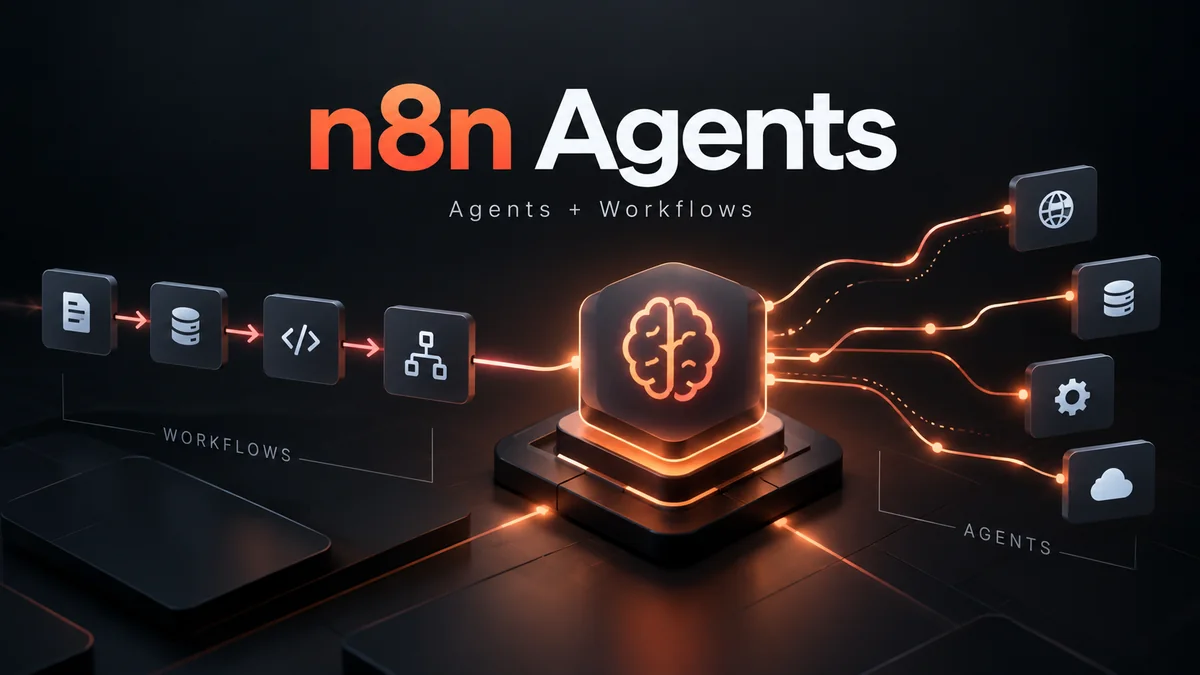
n8n has launched a new first-class Agents experience that sits alongside workflows instead of forcing every agent into a workflow canvas. Announced on September 25, 2026, n8n Agents are designed for open-ended work where the exact sequence of steps is not known in advance: you describe the goal, choose a model, attach tools, workflows, knowledge and channels, and the agent decides how to proceed.
The important part is that this does not replace n8n workflows or the existing AI Agent node. Workflows remain the better fit for deterministic processes, and the AI Agent node continues to work as before. The new Agents product adds a higher-level artifact with built-in sessions, memory, publishing, channels, schedules, approvals and reusable tools.
This guide explains what changed, how n8n Agents differ from workflows and the AI Agent node, how pricing works, who can use the feature, what self-hosted users need, and where the new model makes practical sense.
What changed with n8n Agents?
Before this release, most agentic systems in n8n were assembled inside workflows: a chat trigger, an AI Agent node, memory, tools, routing and whatever supporting nodes the use case needed. That approach still works, but n8n now treats an agent as its own first-class object in the project.
| Before | Now with n8n Agents |
|---|---|
| Agent behavior usually lived inside a workflow. | Agents live beside workflows as independent project artifacts. |
| You assembled memory, triggers and surrounding workflow logic yourself. | Sessions, memory, channels, schedules, versions and approvals are built into the agent experience. |
| Workflows could contain AI Agent nodes. | Workflows can still contain AI Agent nodes, and can also message a published Agent. |
| Open-ended conversations often needed custom workflow scaffolding. | Agents are designed specifically for open-ended, back-and-forth jobs. |
n8n describes the relationship in two directions: sometimes the workflow stays in charge and uses an agent for one step; other times the agent is in charge and calls workflows as tools. The platform now supports both patterns directly.
n8n Agent vs Workflow vs AI Agent node
The names are close enough to be confusing, but they solve different problems.
| Option | Best for | Who controls the sequence? | State / memory |
|---|---|---|---|
| Workflow | Repeatable, deterministic automation with known steps. | You define the sequence. | Depends on workflow design. |
| AI Agent node | Adding model-driven reasoning to one part of a workflow. | The workflow remains the outer controller. | Configured through the workflow and connected nodes. |
| n8n Agent | Open-ended tasks, conversations, recurring autonomous work and tool selection. | The agent decides what to do within the tools and permissions you provide. | Sessions are built in; episodic memory can extend across sessions. |
If a lead always needs to be enriched, scored and routed through the same stages, a workflow is still the cleaner choice. If a support request can branch in unpredictable ways and may need several rounds of context gathering, an Agent is a more natural fit.
Existing users should note one migration point: the AI Agent node has not been deprecated or changed by this launch. n8n explicitly says existing builds continue working.
What can an n8n Agent contain?
According to n8n’s current documentation, an Agent can include:
- Model: the language model used for reasoning and responses.
- Instructions: the role, tone, constraints and tool preferences.
- Tools: built-in n8n integrations, workflows, custom tools and MCP servers.
- Web search: either a model-native search capability or a fallback such as Brave Search or self-hosted SearXNG.
- Skills: reusable bundles of instructions and tools for specific tasks.
- Channels: external places where users can reach the agent.
- Schedules: recurring jobs against the published version.
- Sub-agents: published agents that another agent can delegate to.
- Knowledge base: uploaded files the agent can search and read.
- Memory: session memory plus optional episodic memory across sessions.
Supported knowledge file types currently include CSV, PDF, Markdown and TXT. Session memory is on by default. Episodic memory, which lets the agent recall context from earlier sessions, currently requires an OpenAI credential.
Workflows become tools for Agents
One of the strongest parts of the design is that an Agent does not need direct access to every underlying system. You can expose an existing workflow as a tool and let that workflow enforce a narrow, predictable action.
For example, instead of giving a support Agent broad CRM write access, you could expose a workflow whose only job is to add a note to one specific field. The Agent decides when to use it, but the workflow defines exactly what happens.
This is useful for reliability and security. It creates a practical boundary between model discretion and deterministic business logic.
If you are new to the workflow side of n8n, see our n8n tutorial for beginners. For a broader platform comparison, see n8n vs Zapier.
Approvals, credentials and auditability
n8n Agents include several controls that matter once an agent can take actions rather than only answer questions.
- Approvals: sensitive tools can pause and require a human to approve or reject the call.
- Per-tool credentials: tools run with the credentials attached to them rather than giving the agent unrestricted access to instance-wide secrets.
- Role-based access: the ability to edit and publish an Agent follows n8n roles.
- Sessions and execution logs: sessions record messages, tool use, outputs and errors for later review.
- Draft and published versions: teams can edit a draft while the current published version continues running.
For higher-risk automations, the sensible pattern is still to minimize the blast radius: expose narrowly scoped tools, require approval for writes to systems of record, test in a limited channel and review session logs. Our AI agent security guide covers the broader permission and prompt-injection risks.
Channels, schedules and MCP
A published Agent can be used outside the Agent Builder. n8n’s current documentation lists Slack, Telegram and Linear as available channels. n8n’s launch post also discusses broader channel and trigger options, but the docs are the safer source for what is currently exposed as a supported channel.
Schedules can run hourly, daily, weekly, monthly or through a custom cron expression. Scheduled jobs always run against the published version, not an unpublished draft.
Agents can also be built and managed through n8n’s instance-level MCP server. If an MCP client such as Claude Desktop or Claude Code was connected before Agents became available, n8n says it must be reconnected to receive the new Agent-management permissions.
Using an Agent inside a workflow
n8n provides two patterns for using Agents from workflows:
- Create an Agent inline as a node directly inside a workflow.
- Message an existing published Agent from a workflow, so multiple workflows can call the same centrally managed Agent.
The second pattern is especially useful when you want one Agent identity, instruction set and memory configuration to be reused across several automations. Update and republish the Agent once, and callers use the updated published version.
n8n Agents pricing: how executions are counted
n8n is not introducing a separate per-Agent subscription price in the launch documentation. Instead, Agent activity consumes the same execution quota used by workflows.
One turn with an Agent counts as one execution. n8n defines a turn as one exchange where the user sends a message and the Agent produces a response. Tool calls to workflows and sub-agents do not count as separate executions, according to the launch post.
As of September 26, 2026, n8n’s public pricing page lists:
| Plan | Current annual-billing price | Included monthly executions | Hosting |
|---|---|---|---|
| Starter | €20/month | 2,500 | n8n Cloud |
| Pro | €50/month | 10,000 | n8n Cloud |
| Business | €667/month | 40,000 | Self-hosted |
| Enterprise | Contact sales | Custom | Cloud or self-hosted |
Starter currently includes 2,300 AI credits per month, while Pro lists up to 13,700 AI credits per month. Those credits are relevant when using n8n Assistant to help build an Agent. They are separate from the basic execution counting model for running an Agent.
Prices and plan entitlements can change, so teams should confirm the live n8n pricing page before budgeting.
Availability: who gets n8n Agents?
The feature is currently in Preview, not general availability.
- n8n Cloud: available to everyone running the latest stable version.
- Self-hosted: supported with additional setup.
- Self-hosted Enterprise: not ready yet; n8n says support is coming soon.
Because it is a Preview feature, n8n warns that behavior can change and Agents can make mistakes. Production users should test before publishing and keep approvals on sensitive actions.
Self-hosted requirements and current limitations
Self-hosted Agents are available from n8n 2.32.3. Administrators can enable the agents module through N8N_ENABLED_MODULES.
There are two setup levels:
- Manual Agent setup: enable the Agents module, choose the model, write instructions and attach tools and skills.
- Full AI-assisted experience: additionally configure n8n Assistant (
instance-ai) so n8n can scaffold Agents from natural-language descriptions.
There are several important limitations today. A self-hosted knowledge base needs a Daytona sandbox, channel connections need a public WEBHOOK_URL, and queue mode is not supported for Agents yet. n8n specifically recommends regular mode for now because channel connections can fail in queue mode.
That queue-mode limitation is particularly important for larger self-hosted deployments. Teams that rely on queue mode for scale should not assume the new Agent runtime fits their existing production topology yet.
What n8n Agents change for automation teams
1. Agents and workflows are no longer competing abstractions
The product now makes the boundary explicit. Use a workflow when the process is known. Use an Agent when the goal is known but the path may vary. Combine them when an Agent needs safe, deterministic tools.
2. Reusable Agent identity becomes practical
Instead of copying agent logic across multiple workflows, teams can publish one Agent and call it from channels, schedules and workflows. That should make instruction updates, governance and auditing easier.
3. Execution economics matter for conversational workloads
Because every turn counts as one execution, a chatty Agent can consume quota differently from a workflow that runs once per business event. Teams should estimate conversation volume rather than assuming Agent cost behaves like a fixed workflow.
4. Self-hosting is supported, but not feature-identical yet
n8n is unusual among mainstream automation platforms in offering self-hosting, and Agents extend into that model. But Preview limitations — especially queue mode, knowledge-base dependencies and self-hosted Enterprise support — mean production architecture still needs careful review.
5. Security shifts toward tool design
The most important safety decision may be what tools you expose. A narrow workflow-as-tool can be much safer than handing an Agent a broad API credential and relying on instructions alone.
Should you use an n8n Agent or keep a workflow?
Use a workflow when the steps should be stable, predictable and easy to audit. Use an n8n Agent when the task is open-ended, requires conversation, needs to choose among tools dynamically or should persist across sessions. Use the AI Agent node when you want model reasoning inside a larger deterministic workflow.
For many production systems, the strongest architecture will be hybrid: the Agent handles interpretation and decision-making, while workflows handle narrow actions with controlled credentials and deterministic behavior.
That pattern also fits the broader shift described in our AI automation guide: agents are most useful when they complement reliable automation instead of replacing it everywhere.
FAQ
Are n8n Agents replacing workflows?
No. Agents live alongside workflows. Workflows remain the intended option for fixed, deterministic processes, and Agents can use workflows as tools.
Is the existing AI Agent node being removed?
No. n8n says the AI Agent node continues to work as before, and existing builds do not need to be migrated because of this launch.
How much does one n8n Agent run cost?
n8n counts one Agent turn as one execution. Agents and workflows share the same execution quota on your plan. Model-provider costs or AI credits can still apply depending on how the Agent is configured.
Can n8n Agents run on self-hosted n8n?
Yes, from n8n 2.32.3 with additional setup. However, self-hosted Enterprise support is not ready yet, and queue mode is currently unsupported for Agents.
Can an Agent call my existing workflows?
Yes. Existing workflows can be exposed as Agent tools, and workflows can also message a published Agent.
Are n8n Agents generally available?
No. n8n currently labels Agents as a Preview feature.
Sources
- n8n Blog: Introducing n8n Agents — September 25, 2026.
- n8n Docs: Build and manage agents.
- n8n: Plans and pricing.
Last updated: September 26, 2026. n8n Agents are in Preview, so availability, limitations and plan details may change as the feature develops.
AI-XBlog Weekly Brief
Keep up with AI that actually works
Join the AI-XBlog Weekly Brief for major AI updates, practical workflows, useful tools, and editor’s picks. No daily noise.
Reader discussion
Join the discussion
Have you tried this tool or workflow? Share your experience, corrections, or questions. Useful reader feedback may help us improve this article.
All comments are reviewed before publication. Your email address will not be published. Promotional links and low-value spam are removed.