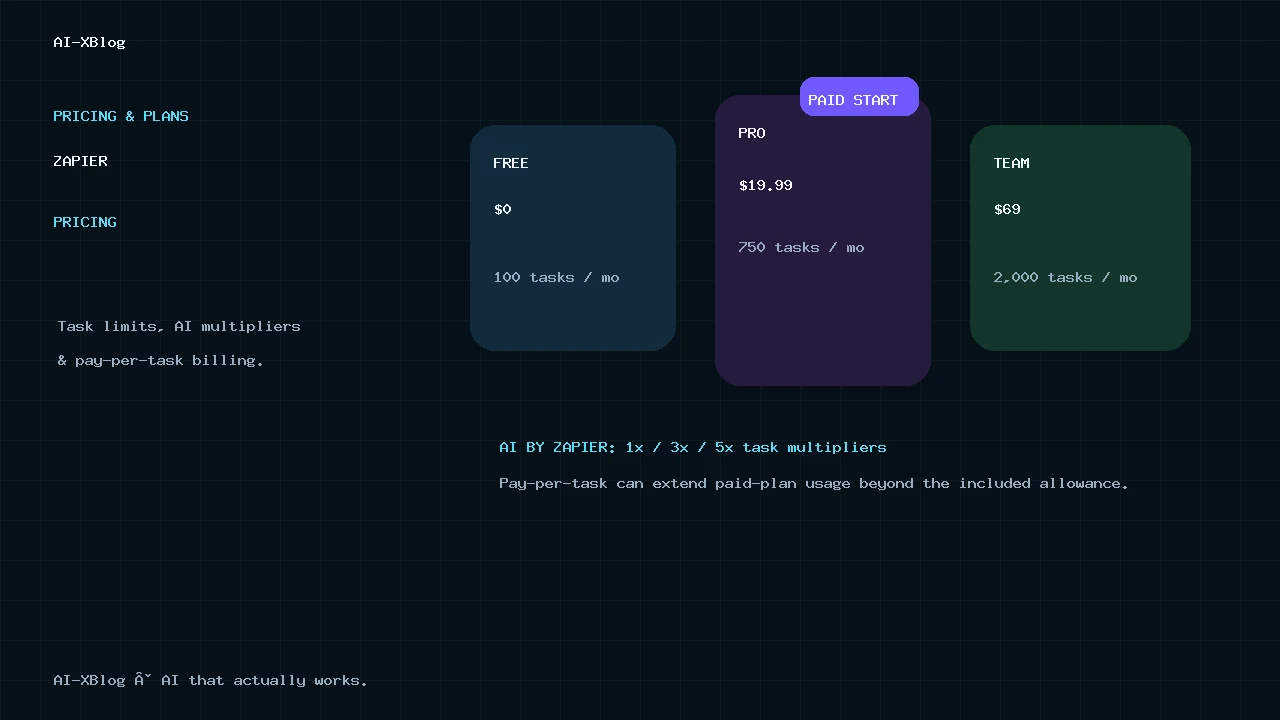
Zapier pricing in 2026 starts at $0 for Free, $19.99/month for Professional and $69/month for Team when you use the entry task tiers and annual billing. Enterprise is custom-priced. But the subscription price is only the first part of the bill: Zapier is task-based, paid plans can continue into pay-per-task billing, and AI by Zapier can consume 1×, 3× or 5× tasks before tool calls are added.
That makes the real buying question less about “Which plan has the lowest monthly price?” and more about how many counted actions your workflows perform, how often they run, whether AI steps use tools, and how much overflow you are willing to allow.
Methodology: this is a documentation-verified pricing guide based on Zapier’s current pricing page and official billing, task-usage, AI-by-Zapier and Agents-migration documentation checked September 26, 2026. It is not presented as a hands-on billing test. Zapier prices, task tiers and usage rules can change, so this page should be maintained as living content.
Zapier pricing at a glance
| Plan | Starting price | Entry task allowance | Best fit |
|---|---|---|---|
| Free | $0 | 100 tasks/month | Testing Zapier and simple two-step automations |
| Professional | $19.99/month, billed annually | 750 tasks/month | Individuals and small teams that need multi-step workflows, premium apps and webhooks |
| Team | $69/month, billed annually | 2,000 tasks/month | Teams that need shared workflows, connections, SSO and centralized collaboration |
| Enterprise | Custom | Custom / annual task limits | Organizations that need advanced governance, deployment options, observability and support |
Those are starting points, not universal monthly bills. Professional and Team pricing changes with the task tier you choose, and Zapier’s pricing page currently advertises 33% savings for yearly billing. Currency and taxes can also change the checkout amount.
Zapier now includes unlimited Zap workflows across all plans, so the old question “How many Zaps can I create?” matters less than how many tasks those workflows consume.
The core billing unit: what counts as a Zapier task?
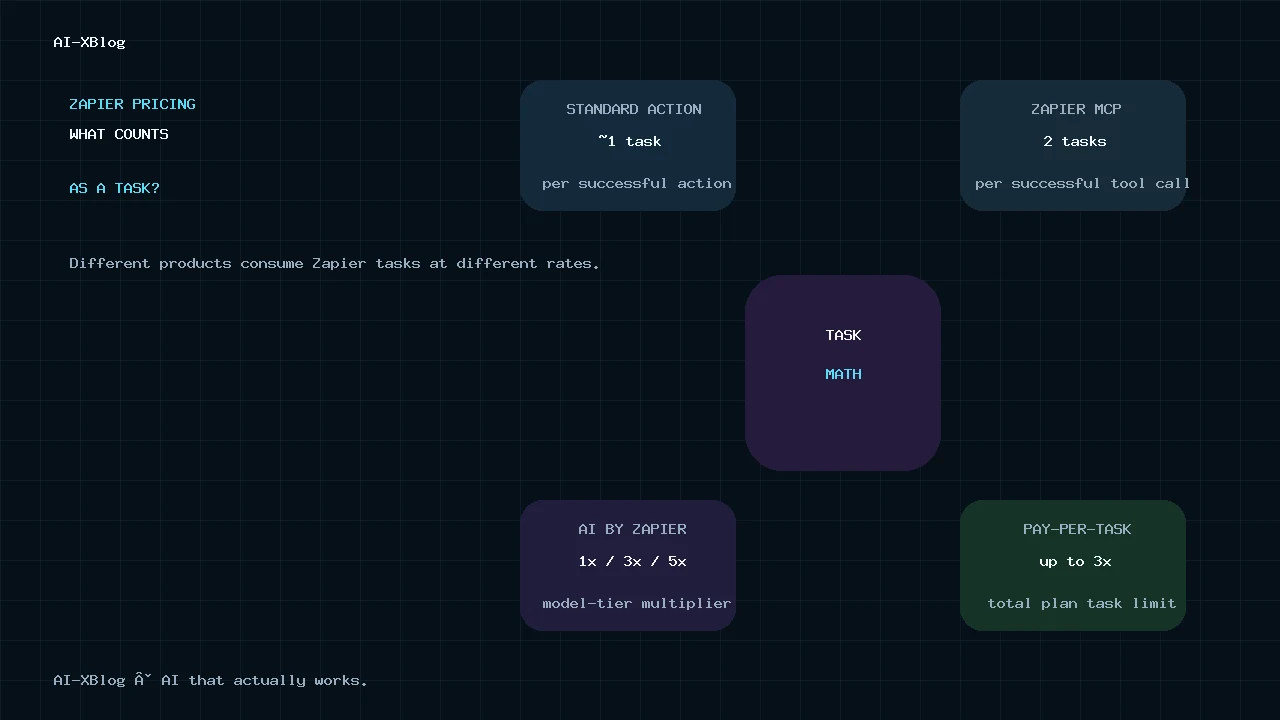
For standard Zap workflows, a task is generally counted when an action step runs successfully. The trigger that starts the Zap does not count as a task, and several built-in logic or Zapier-owned utility steps do not consume tasks under current plans.
This means a workflow’s visual complexity is not the same thing as its bill. What matters is the number of counted actions that successfully execute.
| Step type | Typical task treatment |
|---|---|
| Trigger | Does not count as a task |
| Successful external app action | Usually 1 task |
| Filter / Paths / Formatter on current plans | Does not count as a task |
| Several Zapier-built utility apps | Do not count under current-plan rules |
| AI by Zapier | Uses model-tier multipliers and tool-call task math |
| Code by Zapier | Uses task-based runtime rules, including additional usage for extended runtime |
A simple task-cost example
Suppose a Zap runs 1,000 times per month and each run completes four counted external action steps:
1,000 workflow runs × 4 counted actions = 4,000 tasks per month.
If the same workflow also contains Filters or Paths, those logic steps do not necessarily increase the task total under current Zapier rules. This is one reason you should model a real workflow instead of multiplying every box on the canvas.
Our n8n vs Zapier in 2026 comparison shows why this differs from n8n Cloud, where a full workflow run is generally the primary execution unit rather than each successful external action.
Free: $0 and 100 tasks per month
Zapier Free includes 100 tasks per month, unlimited Zap workflows, Tables and Forms, and two-step Zap workflows. It is useful for learning the platform and running a small number of simple automations.
The main limitation is not the number of workflows you can save. It is the low monthly task allowance and the reduced automation depth compared with Professional.
Professional: starts at $19.99/month billed annually
Professional is the normal paid entry point for production Zap workflows. Zapier’s current starting configuration is $19.99 per month on annual billing, with 750 tasks per month at the entry tier.
- Multi-step Zap workflows
- Unlimited Premium apps
- Webhooks
- AI fields
- Conditional form logic
- Email and live chat support
If you are one person or a small team and do not need shared team administration, Professional is usually the plan to evaluate before Team. The real constraint is whether 750 tasks—or the higher task tier you choose—matches your workload.
Team: starts at $69/month billed annually
Team starts at $69 per month on annual billing and the current baseline task allowance is 2,000 tasks per month. The plan supports up to 25 users on the public pricing page.
- Shared Zap workflows and folders
- Shared app connections
- SAML SSO
- Priority support
- Team-level collaboration and administration
The upgrade should therefore be justified by collaboration and governance—not only by wanting more tasks. If you only need a larger task allowance, compare the available Professional task tiers before assuming Team is the cheaper path.
Enterprise: custom pricing and governance
Enterprise is custom-priced. Zapier positions it for organizations that need unlimited users, advanced admin permissions and app controls, advanced deployment options, observability, annual task limits, a Technical Account Manager and higher-touch support.
For Enterprise buyers, the commercial model is less about a public per-seat price and more about task volume, governance, deployment and support requirements.
Next Gen Zaps and Agentic Management: paid-plan early access
Zapier formally unveiled Next Gen Zaps at ZapConnect 2026 on September 23, 2026. The product is currently in early access by request. It is available on Professional, Team and Enterprise, but not Free. The new Workflow Manager lets users build with a visual canvas, plain-language AI assistant or TypeScript. Through Zapier MCP, an MCP-enabled client such as Claude, ChatGPT or Cursor can also build, test and deploy the workflow to Zapier from the conversation. Compared with classic Zaps, Next Gen Zaps can process lists without the old 500-item loop cap, nest loops, split and rejoin branches, catch an error and keep going, pause for a human reply or scheduled follow-up, and run from an API, schedule, another workflow or an AI agent.
The biggest AI change is Agentic Management. An agent can watch live workflow runs, diagnose failures, prepare fixes and suggest optimizations. The Heal, Optimize and Automatically apply fixes controls determine how far it can go without human approval. Zapier still requires approval when a proposed change expands what the workflow can do, changes authentication or other protected assets, or when the agent has low confidence.
There is an important pricing caveat: Zapier’s early-access documentation says some Enterprise capabilities are not yet supported or confirmed to behave the same way in Next Gen Zaps, including task limits and billing. So do not assume the normal classic-Zap task math in this guide applies unchanged to a Next Gen Zap until Zapier publishes final billing rules. Zapier also advises against using the most sensitive workflows during early access.
For current details, see Zapier’s Next Gen Zaps early-access guide and Agentic Management documentation.
Pay-per-task billing can make a paid plan cost more than the subscription
Paid Zapier plans support pay-per-task billing so business-critical Zaps can keep running after the included task allowance is exhausted.
For many newer accounts, pay-per-task is enabled by default. The current Zapier help center says the exact extra-task rate depends on the plan and billing cycle, so the Billing settings page—not an old universal multiplier quoted in a blog post—is the source of truth for your account.
You can turn pay-per-task off if you prefer a hard stop. When it is disabled, Zap runs are held after the task limit is reached and can be replayed once usage resets or the plan is upgraded.
The pay-per-task ceiling is 3× the plan’s task limit
Zapier currently caps pay-per-task usage so the account cannot continue indefinitely. The maximum is three times the selected plan’s normal task limit, including the included allocation.
Zapier’s own example uses Professional 750:
750 included tasks + up to 1,500 pay-per-task tasks = 2,250 maximum tasks for the cycle.
Once that ceiling is reached, additional Zap runs are held until the billing cycle resets or the plan changes.
AI by Zapier changed the task math in June 2026
One of the biggest 2026 pricing changes is that AI by Zapier no longer has one simple task cost. New AI steps use a model-tier multiplier:
| AI model tier | Task multiplier | Tool support | Practical use |
|---|---|---|---|
| Standard | 1× | No | Simple prompts without tools |
| Advanced | 3× | Yes | Tool workflows with a middle cost tier |
| Premium | 5× | Yes | Complex tool workflows using the highest model tier |
| Your own AI account | 1× | Supported with qualifying models | Model-provider cost is separate; Zapier task usage is lower |
Zapier’s newer model-tier pricing page says new AI by Zapier steps on paid plans default to Premium (5×). An older launch explainer still says Advanced (3×), so this is a living-content detail rather than a rule to memorize. We follow the newer model-tier page and recommend checking the step’s selected tier before estimating task cost.
AI by Zapier tool calls multiply the cost again
The current formula is:
Tasks per AI run = (1 × model rate) + (number of tool calls × model rate).
That means an AI step using the Premium 5× tier with two successful tool calls consumes:
(1 × 5) + (2 × 5) = 15 tasks per run.
Run that step 100 times and the AI step alone can consume 1,500 tasks before you count other billable actions elsewhere in the Zap. This is why AI-heavy workflows should be modeled separately from ordinary Zap automation.
Zapier also places a 75-task limit on a single AI by Zapier step run; when a step reaches that level, the run pauses for approval before continuing.
Code by Zapier can also consume additional tasks
Code by Zapier moved to task-based runtime billing in 2026. Professional and Team currently include 30 seconds of standard runtime per Code step; extended runtime is measured at one additional task per 30 seconds. Enterprise has a longer standard runtime before extended-runtime billing begins.
For short transformations this may not matter. For long-running code, API polling or heavy data processing, runtime itself can become part of the task budget.
Zapier MCP also draws from task usage
Zapier’s current task-usage documentation says Zapier MCP uses 2 tasks per successful tool call. MCP usage comes from the same account task allocation used by Zap workflows, AI steps, code and SDK, so giving an AI assistant access to actions across your connected apps does not create a separate unlimited execution pool.
This is another reason to treat Zapier pricing as an orchestration budget rather than only a workflow-subscription price.
Zapier Agents and AI by Zapier currently coexist during migration
Zapier is migrating the standalone Agents product at agents.zapier.com into AI by Zapier inside the Zap editor. Zapier’s migration guidance describes what happens after an agent is migrated, but Zapier’s current pricing page still lists standalone Agents plans: Free with 400 activities per month, Pro at $400 billed annually ($33.33/month equivalent) with 1,500 activities per month, and Enterprise with custom pricing. In other words, AI by Zapier is the migration destination for agentic workflows inside Zaps, while standalone Agents pricing remains publicly listed today. See Zapier’s official Agents migration guide.
| AI by Zapier tier | Task multiplier | Tool support |
|---|---|---|
| Standard | 1× | No tools |
| Advanced | 3× | Yes |
| Premium | 5× | Yes; default for new paid-plan AI steps |
For migrated agentic workflows, budget with Zapier tasks rather than the old standalone Agents activity meter. AI by Zapier uses the selected model-tier multiplier, and successful tool calls add tasks at the same multiplier. Bring Your Own Key runs at a 1× Zapier task rate, while the external model provider may bill you separately.
Worked example: a normal Zap vs an AI-heavy Zap
| Workflow | Runs/month | Task math | Approx. tasks/month |
|---|---|---|---|
| Lead form → CRM → email → Slack | 500 | 3 counted actions × 500 | 1,500 |
| Premium AI step, no tools | 500 | 5 tasks × 500 | 2,500 |
| Premium AI step + 2 tool calls | 500 | 15 tasks × 500 | 7,500 |
| Advanced AI step + 1 tool call | 500 | 6 tasks × 500 | 3,000 |
These examples isolate the relevant steps; a full workflow may contain other billable actions. The point is not that AI by Zapier is “too expensive.” It is that the model tier and tool-call count materially change the task budget.
Zapier vs n8n pricing: the billing unit matters more than the plan name
Zapier and n8n should not be compared by lining up “Professional” or “Pro” plan names. Their core usage units differ.
- Zapier: successful action tasks are the core meter, with separate task rules for AI and code.
- n8n Cloud: the main plan allowance is based on complete workflow executions rather than each action step.
- n8n self-hosting: shifts cost toward infrastructure, operations and model/API usage rather than a cloud execution allowance.
For the full comparison, see n8n vs Zapier in 2026. For n8n’s current plan prices and self-hosting economics, see our n8n Pricing in 2026 guide.
Which Zapier plan should you choose?
| If this describes you | Start with | Why |
|---|---|---|
| I am learning Zapier or have very light two-step automation | Free | 100 tasks can validate the workflow before paying |
| I need multi-step Zaps, premium apps or webhooks | Professional | Lowest normal production tier |
| Several people need shared connections, folders and SSO | Team | The upgrade is mainly about collaboration and governance |
| We need organization-wide governance, observability and custom commercial terms | Enterprise | Those features sit above self-serve Team |
| Our workflows frequently exceed the included task allowance | Higher task tier before relying on pay-per-task | Predictable committed capacity can be easier to budget than recurring overflow |
| AI by Zapier consumes most of our tasks | Revisit model tier, tool calls and BYOK | The AI multiplier may matter more than the base plan |
If you are deciding what to automate before choosing a platform, use our 7-factor small-business automation scorecard. Tool selection should come after the workflow is worth automating.
Four Zapier pricing mistakes to avoid
- Counting every Zap step as one task. Triggers and several built-in logic/tools do not count under current rules.
- Assuming Professional is capped at $19.99. That is a starting annual-billing price; higher task tiers and pay-per-task usage can raise the bill.
- Ignoring the AI multiplier. A Premium AI step with tools can use many more tasks than a normal action.
- Using pay-per-task as your default capacity plan. Overflow is useful for spikes, but a consistently high workload may deserve a higher committed task tier.
FAQ
How much does Zapier cost per month?
Zapier currently offers Free at $0, Professional starting at $19.99 per month on annual billing, Team starting at $69 per month on annual billing, and custom Enterprise pricing. The actual paid price changes with task tier, billing cycle, currency and taxes.
How many tasks are included in Zapier Professional?
The current entry Professional tier includes 750 tasks per month. Higher task tiers are available and cost more.
What happens if I exceed my Zapier task limit?
On paid plans with pay-per-task enabled, Zapier can continue running and bill extra tasks up to the current pay-per-task ceiling. If pay-per-task is disabled or the ceiling is reached, additional Zap runs are held until capacity becomes available or the plan changes.
Does AI by Zapier use more than one task?
Yes. Current model tiers use task multipliers: Standard 1×, Advanced 3× and Premium 5×. Tool calls add tasks at the same multiplier. A Premium run with two tool calls uses 15 tasks under the current formula.
How is Zapier Agents billed after migration?
Zapier is migrating some standalone Agents workflows into AI by Zapier inside Zaps, but the standalone Agents product still has its own activity-based plans today. Agents Free includes 400 activities per month; Agents Pro includes 1,500 activities per month and is listed at $400 billed annually ($33.33/month equivalent); Enterprise uses a custom activity allowance. Migrated workflows use Zapier’s task-based AI-by-Zapier billing instead, so the billing basis depends on which product path you are actually using.
Bottom line
Zapier Professional is the logical starting paid plan for most individual production users, but task economics—not the $19.99 headline—determine the real cost. Team should be justified by collaboration and governance. Enterprise is for organization-wide controls and commercial scale.
For AI-heavy workflows, model tier and tool-call count can dominate the task budget. Before upgrading the whole account, inspect which actions are counted, whether pay-per-task is enabled, and whether AI steps can use a lower tier or a more efficient architecture.
Primary sources
Source check: September 26, 2026. Zapier plan prices, task tiers, AI model-rate rules and Agents migration details can change; this page should be rechecked after material pricing or task-accounting changes.
- Zapier — Plans & Pricing
- Zapier Help — How Zapier Agents usage is measured
- Zapier Help — How task usage is measured
- Zapier Help — Zap limits
- Zapier Help — Pay-per-task billing
- Zapier Help — AI by Zapier model tier pricing
- Zapier Help — Code by Zapier usage
- Zapier Help — How to select your plan
- Zapier — What is a task?
- Zapier Help — Migrating from Agents to AI by Zapier
- Zapier Help — Get started with Next Gen Zaps
- Zapier — The next generation of Zaps is here
AI-XBlog Weekly Brief
Keep up with AI that actually works
Join the AI-XBlog Weekly Brief for major AI updates, practical workflows, useful tools, and editor’s picks. No daily noise.
Reader discussion
Join the discussion
Have you tried this tool or workflow? Share your experience, corrections, or questions. Useful reader feedback may help us improve this article.
All comments are reviewed before publication. Your email address will not be published. Promotional links and low-value spam are removed.